

Description
Most businesses collect praise in three separate places: Google, the inbox, and the product page. Trustie brings all three onto your own site, in your own branding, stored in your own database.
It works with WooCommerce. It works without it.
Three kinds of review, one plugin
- Google Business reviews: your real Google reviews on your own site, with star ratings, reviewer names and a “View on Google” link. Add your Google API key and Place ID, drop in a shortcode, done. JSON-LD schema travels with them, so search engines can pick them up for rich results.
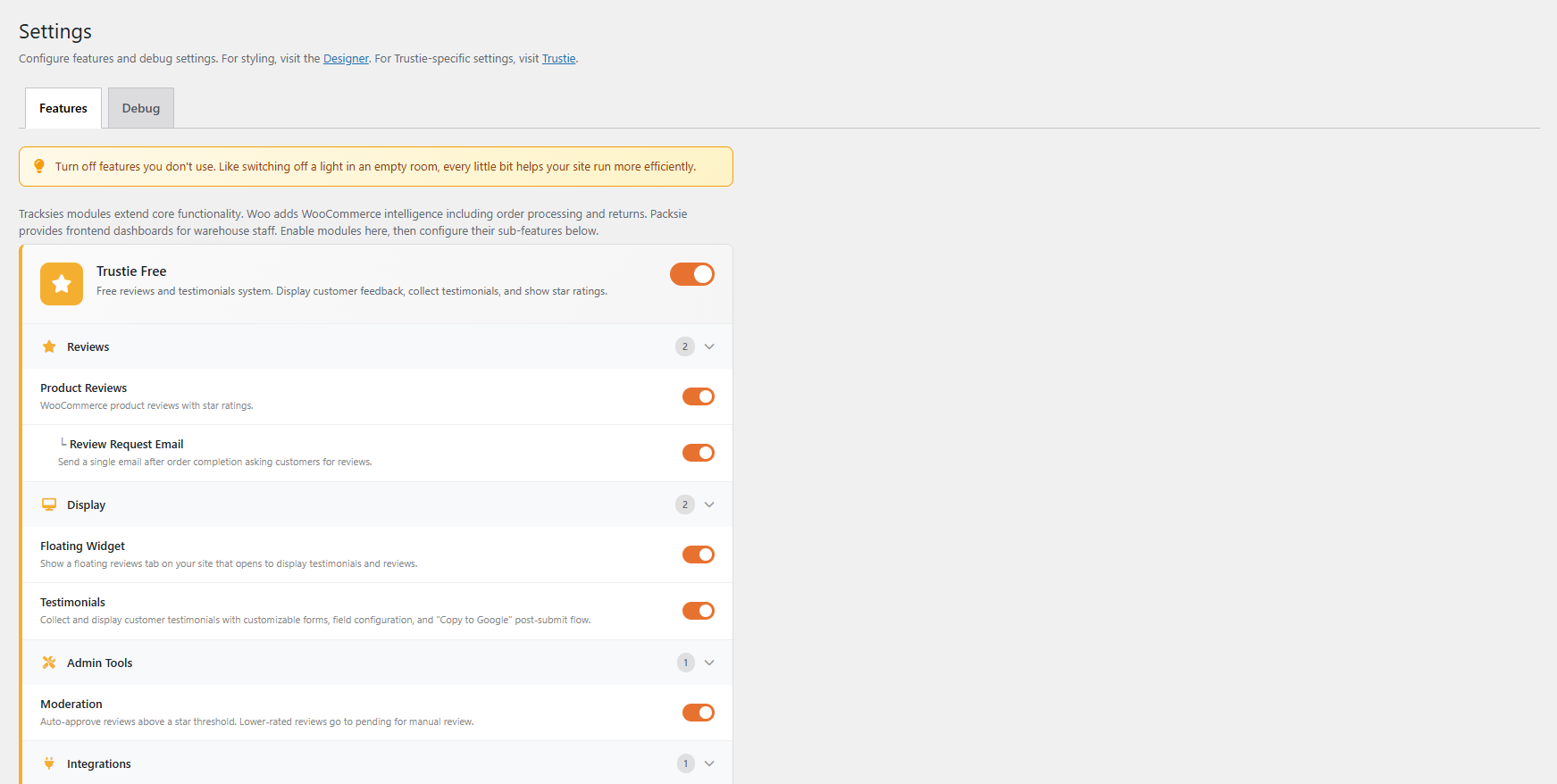
- Testimonials you collect yourself: a proper submission form, displayed as a grid, list, masonry or slider. Auto-approve above a star rating you choose, or moderate every one by hand.
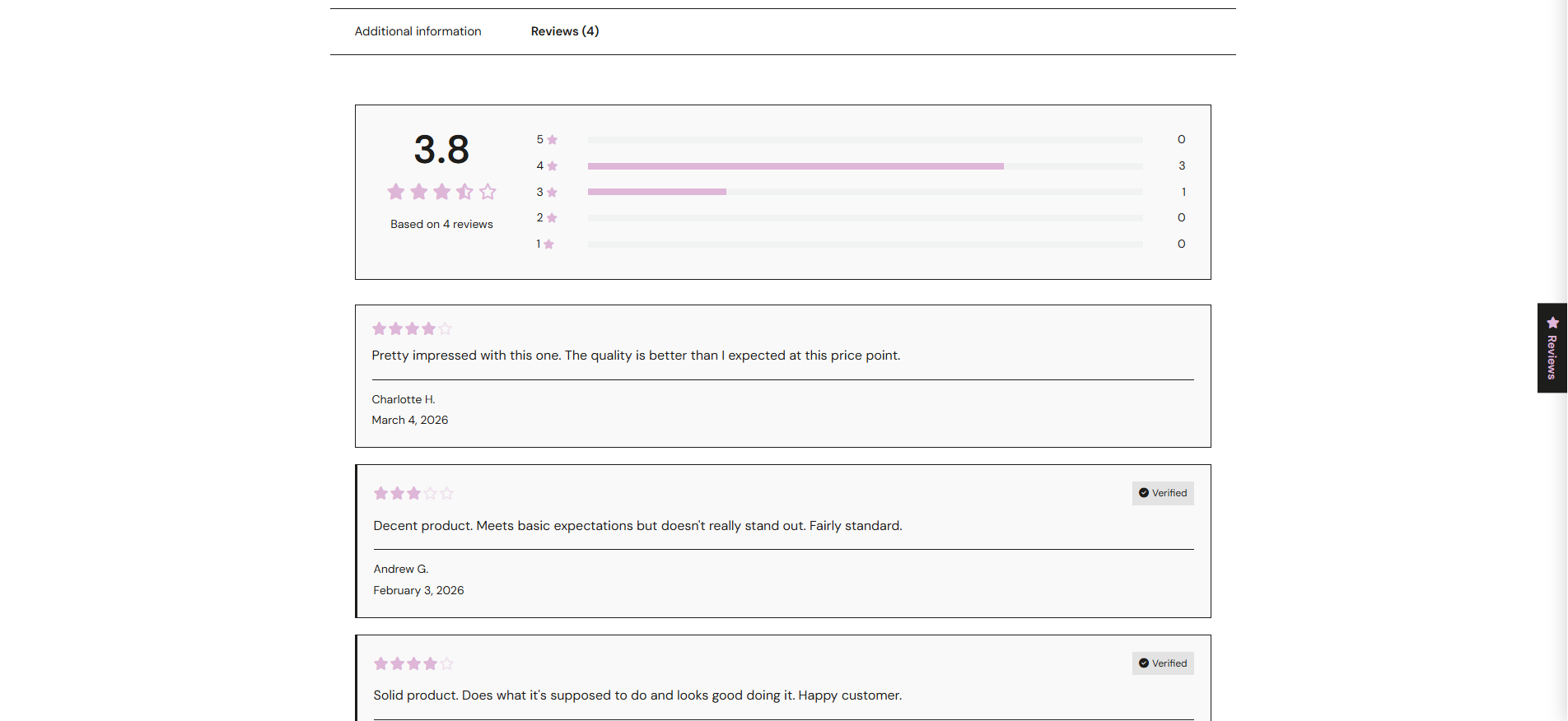
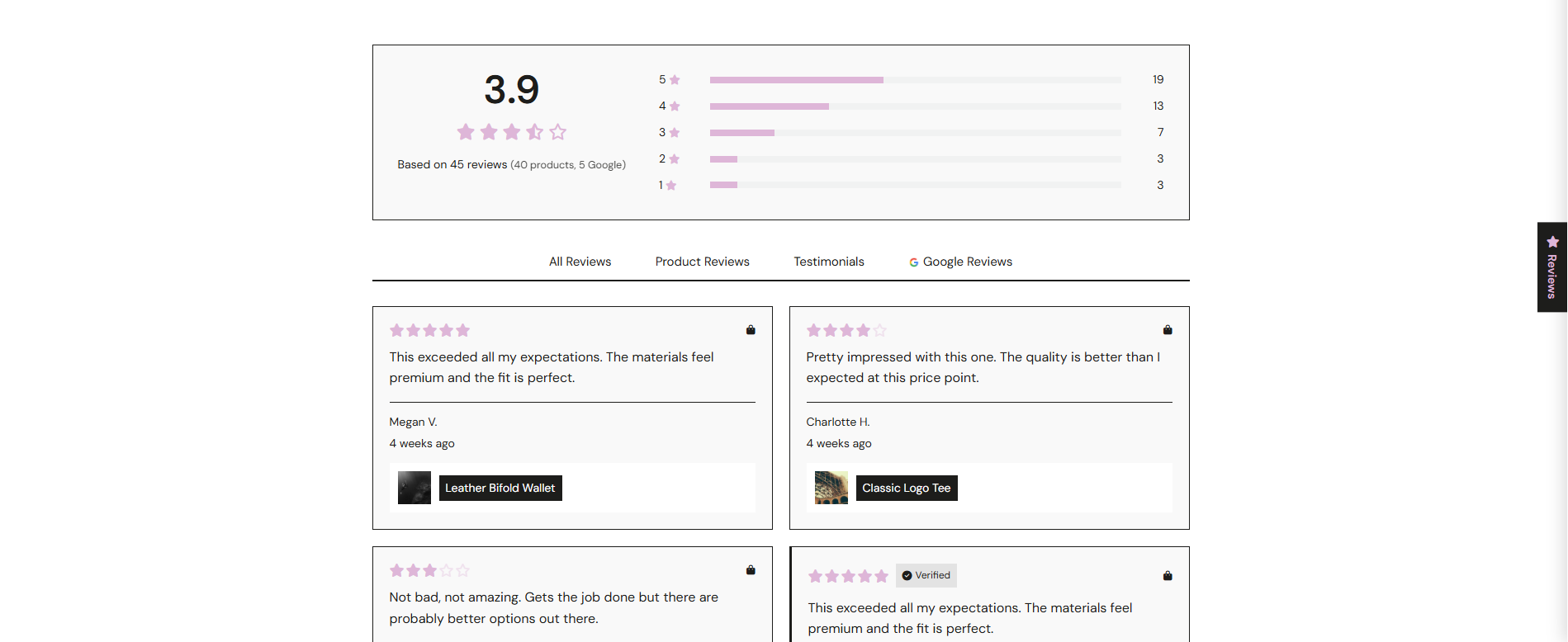
- WooCommerce product reviews: better-looking review cards, star-rating summaries, rating breakdowns, and an automatic review request email after purchase.
Most review plugins specialise in one of those three. Trustie does all of them, so your social proof isn’t scattered across plugins that don’t know about each other.
Your reviews stay in your database
Not ours. Not a third party’s. Product reviews stay in the wp_comments table where WooCommerce already puts them. Testimonials are an ordinary WordPress post type.
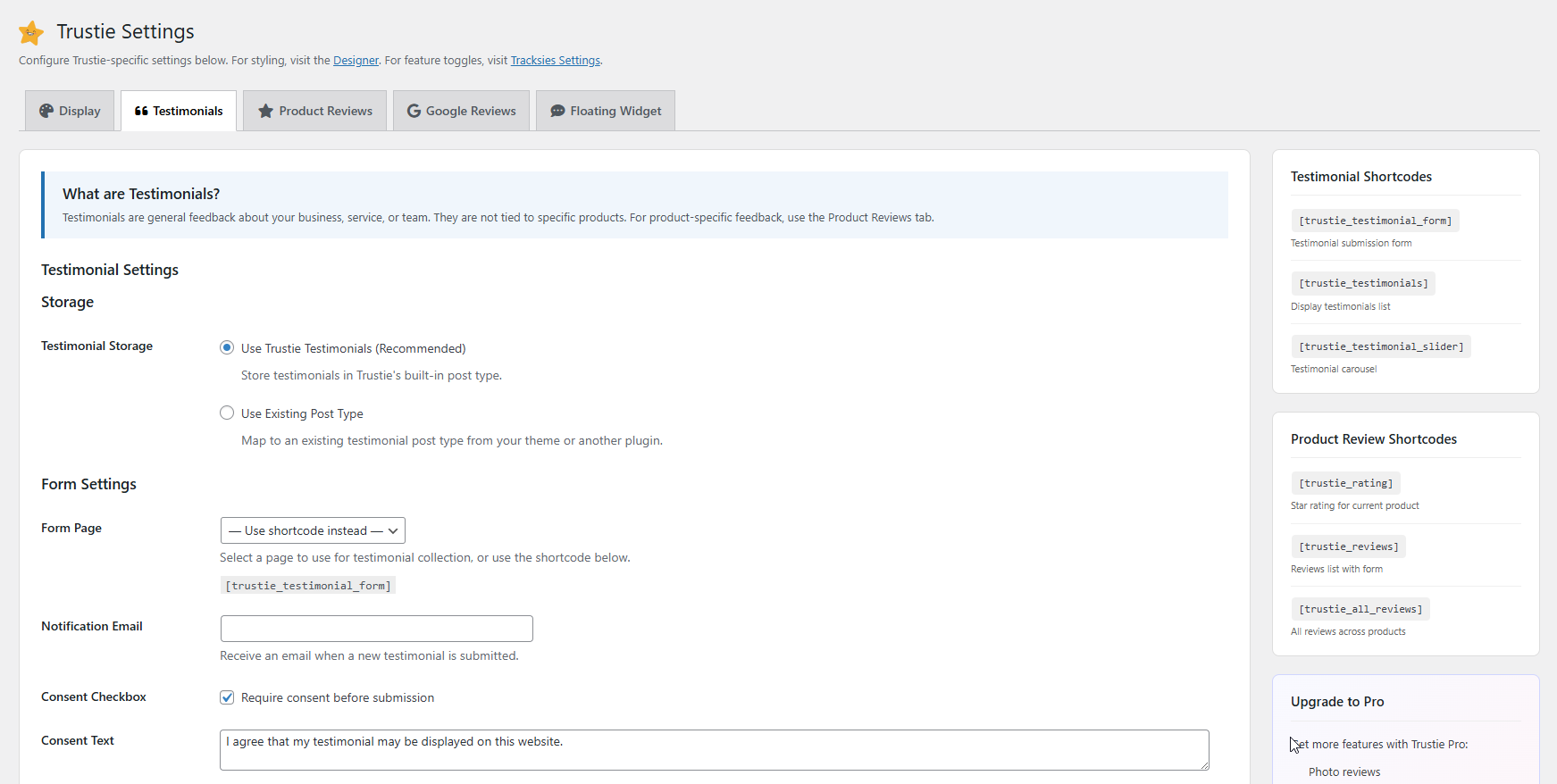
And it doesn’t have to be our post type. If your theme or your previous plugin already registered somewhere for testimonials to live, point Trustie at it instead: pick the post type, tell Trustie which meta keys hold the name, company, role and rating, and it displays what’s already there. Nothing copied, nothing migrated, nothing rewritten. Switch Trustie off again and your posts sit exactly where they were.
There’s no external service in the middle, no account to create, and nothing to be locked out of. If you ever want to export the lot and walk away, you can.
No WooCommerce? No problem
Google reviews, testimonials, the floating widget and the reviews page all work on any WordPress site: service businesses, portfolios, bakeries, accountants, anywhere with happy customers. When WooCommerce is installed, Trustie leans in and handles product reviews too.
What’s in the free plugin
All of it, really. Testimonials, Google reviews, product reviews, import tools, the floating widget, the reviews page and the visual Designer are all included. If you never need more, brilliant.
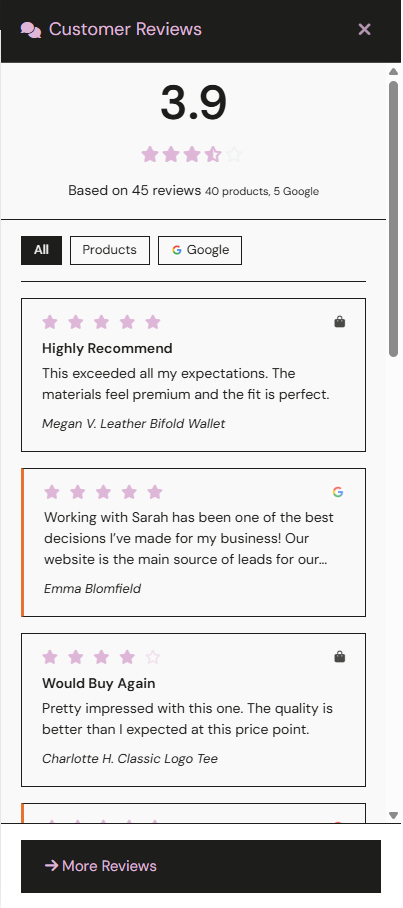
- A floating reviews widget: a slide-out panel showing your latest reviews on every page. The polite version of those pop-ups that chase you around the internet.
- A dedicated reviews page: a
/reviews/page with tabs, filtering and pagination. Works automatically, with or without WooCommerce. - Star ratings anywhere: shortcodes for average ratings on any page, plus lightweight “loop stars” built for archive pages, so category listings stay quick.
- Turn old comments into reviews: if you switched WooCommerce reviews on after already having product comments, one click converts them into star-rated reviews with a default rating you pick. Tidy up individual ratings afterwards.
- Catalogue-wide rating sync: recalculates average ratings and review counts across every product. Handy after imports, migrations, or general database fiddling.
The Designer: reviews that look like they belong on your site
Most review widgets announce themselves. You can spot the bolted-on third-party embed from across the room, because it arrived with its own idea of what a card should look like.
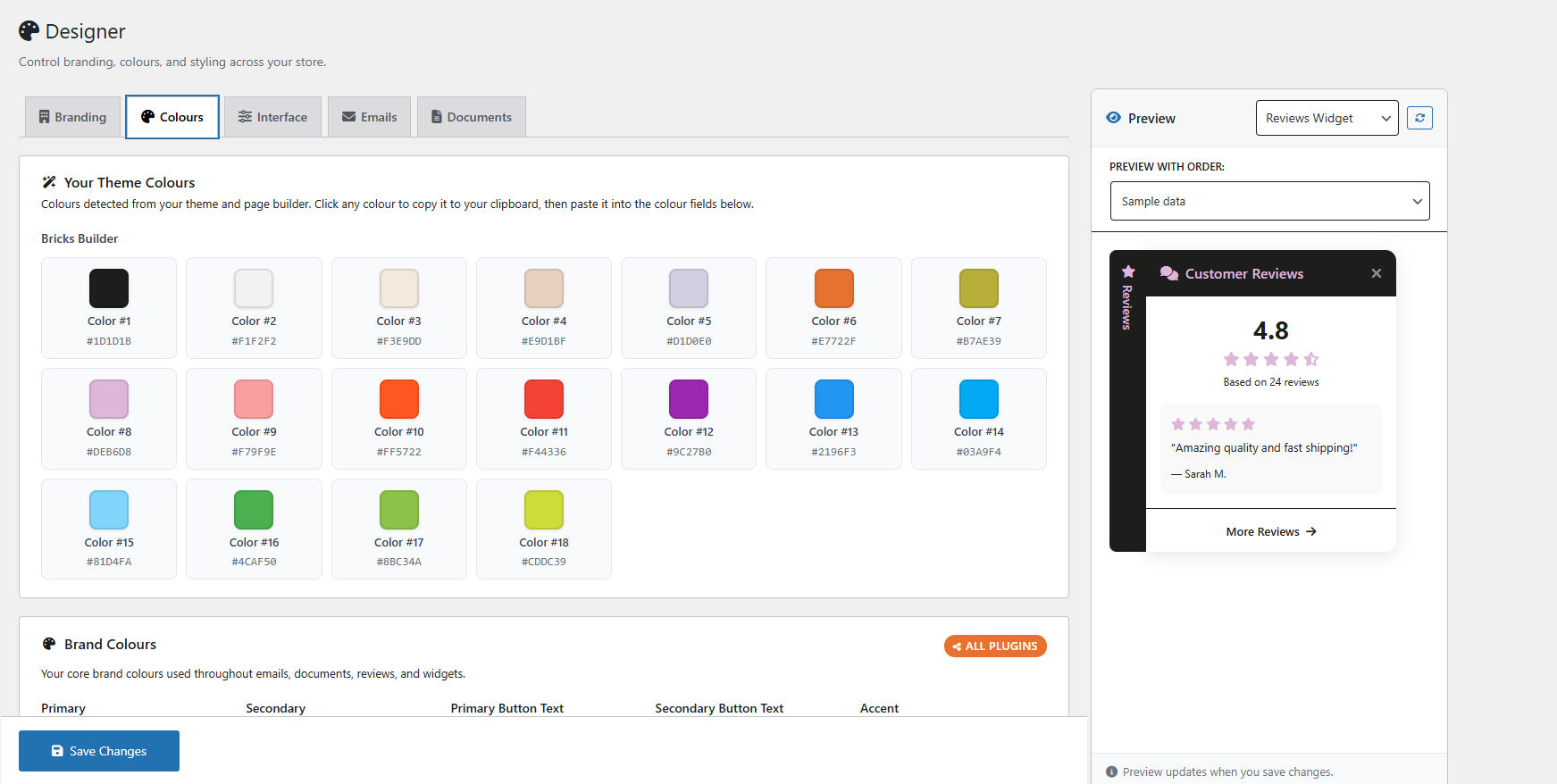
Trustie starts from your site instead. On first run it reads your theme’s fonts and colours and offers them back to you, so the default already looks like the rest of the page. From there, four tabs:
- Colours: your detected theme palette sits at the top, one click to copy. Set primary and secondary colours, button text, accent, and the two that matter most for reviews: filled star colour and empty star colour.
- Interface: corner rounding (square, subtle, medium, rounded), drop shadows (none, on hover, always), and a switch for hover animations. This is how you match a sharp, flat theme or a soft, shadowed one without writing CSS.
- Branding: your logo with width and position, plus business name, tagline, email, phone and address. These feed your emails, your documents and your structured data, so you enter them once.
- Emails. Style the review request email itself: header as standard, banner or minimal; footer as standard, minimal or detailed; colours, footer text, and whether the order items table shows.
And you can see it while you do it. Live previews render your actual review card, testimonial card, buttons, typography and the review request email as you change the settings. No save-and-go-look.
Every setting is applied through CSS variables, so it lands everywhere at once (shortcodes, the widget, the reviews page) and your theme can still override it if you want it to.
Review request emails that know when to stay quiet
When WooCommerce is installed, Trustie emails customers after a purchase asking for a review, because they’re not going to remember on their own. The email is cancelled automatically if the order is refunded, cancelled, returned or failed, if the customer already reviewed something on it, or if they’ve unsubscribed.
Tested with the page builders people actually use
Elementor, Divi, Bricks and Oxygen are all tested. If you use a different builder and something looks off, please tell us. We’d much rather hear it from you than find out from a one-star review (ouch).
Moving from another plugin? We’ll meet you halfway
- Testimonials: auto-detects and imports from Strong Testimonials, Easy Testimonials and Starter Templates. Keep the originals or clear them out once you’re settled, your call.
- Or don’t move them at all: if your testimonials already live in a post type your theme or old plugin registered, map Trustie to it and leave them where they are. Settings > Testimonials > Storage.
- Old product comments: one click, pick a default rating, done.
Built to be accessible
Trustie is tested against WCAG 2.1 AA guidelines and we keep improving: keyboard navigation, visible focus indicators, screen reader announcements for form submissions and content loading, and descriptive labels on interactive controls. If something doesn’t work the way it should for you, tell us. Accessibility is a commitment, not a checkbox.
Shortcodes
Without WooCommerce
[trustie_google_reviews]: your Google Business reviews with aggregate rating and schema. Needs a Google API key and Place ID in Settings > Google Reviews.[trustie_testimonials]: testimonials in grid, list, or masonry.[trustie_testimonial_form]: the submission form.[trustie_testimonial_slider]: auto-advancing carousel.[trustie_testimonial_grid]: grid layout wrapper (convenience shortcut).
With WooCommerce
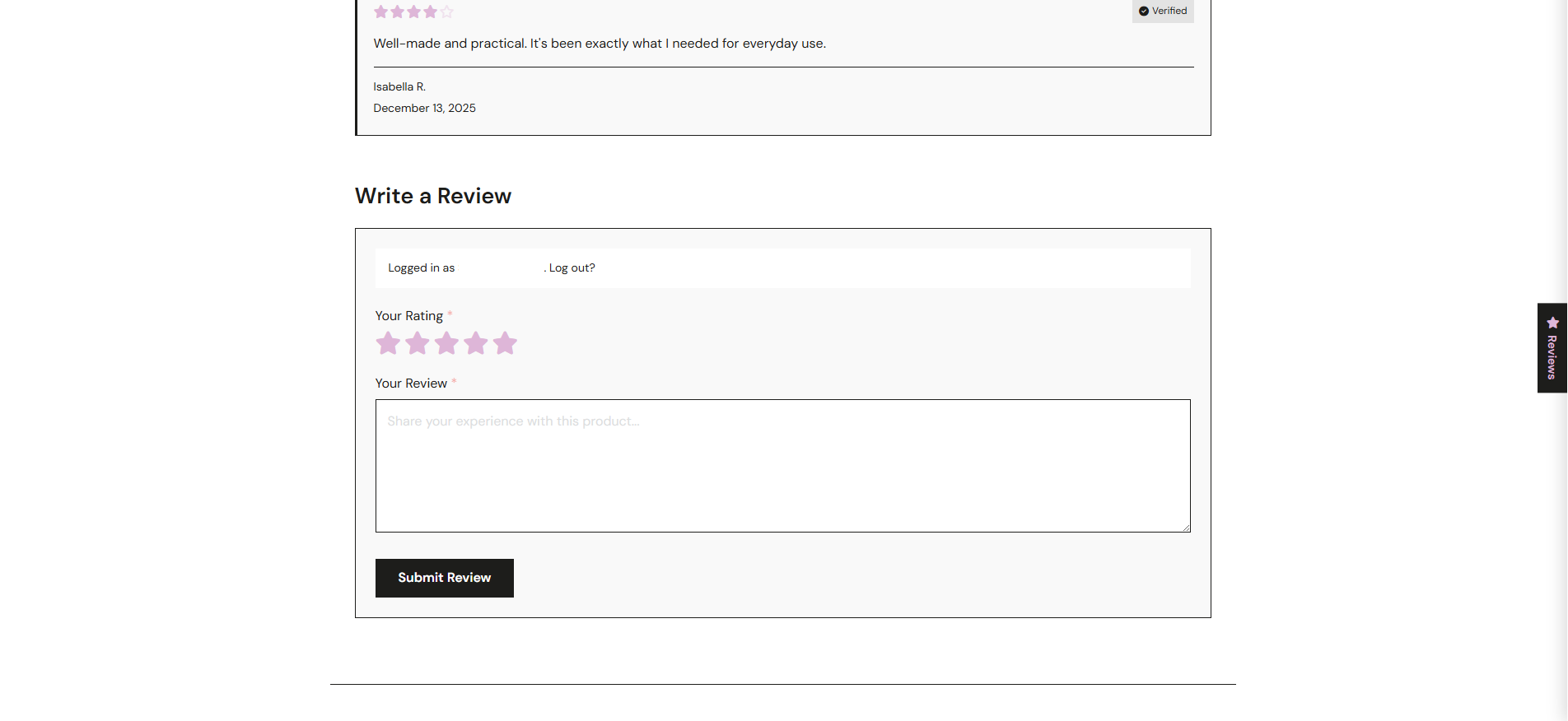
[trustie_reviews]: reviews for a specific product, with optional form and summary.[trustie_all_reviews]: all reviews, from all products, in a grid.[trustie_reviews_page]: full reviews page with pagination.[trustie_review_form]: standalone review submission form.[trustie_rating]: average star rating for a product.[trustie_rating_badge]: compact stars-plus-count badge.[trustie_loop_stars]: lightweight stars optimised for archive loops.
Every shortcode takes optional attributes for customisation. See the full shortcode reference for details.
Plays nicely with the rest of the family
If you add Tracksies HQ, Helpie, Packsie, Perkie, Squizzie or Pipesie alongside Trustie, the admin menus merge automatically into one shared “Tracksies” parent in the WordPress sidebar, not six. No setup; Trustie spots the siblings and adjusts.
The free plugin is meant to be enough
It isn’t a trial and it isn’t crippled. Most sites will never need anything else.
But there are five specific situations where you’d outgrow it, and it seems only fair to say what they are before you install rather than after:
- You have more than five Google reviews and you want all of them. Free uses a Places API key, and Google caps that at five individual reviews (the aggregate rating still counts every one). Trustie Pro connects to your Google Business Profile with a single sign-in and syncs the lot, with no Google Cloud console and no API key to create.
- You sell something regulated. Supplements, therapeutic goods, anything where a cheerful “this cured my arthritis” must not auto-publish. Pro lets you mark a form as regulated: reviewers get guidance about what can and can’t be published, and every review on that form is held for manual approval.
- You want photos on your reviews. Customers attach images, which are resized and compressed automatically and open in an accessible lightbox.
- One follow-up email isn’t enough. Free sends a single review request after purchase. Pro runs a sequence, with the same smart cancellation rules applied throughout.
- You need to ask more than the standard questions. Pro has a drag-and-drop form builder, different forms for different product categories, and custom fields shoppers can filter the reviews by.
If none of those are you, stay on Free. That’s the plugin working as intended.
The rest of the family
- Tracksies HQ. The operational layer for WooCommerce stores: customer intelligence, order management, tags, branded email templates, returns workflow, packing workflow.
Visit tracksies.com if that sounds like your sort of thing.
Privacy and external services, in brief
Trustie connects to two external services. Full detail is in the External Services section below.
- Google Places API: used only when you’ve added your own API key and Place ID, and only to fetch your own Google reviews. No visitor data is sent to Google.
- Appsero: diagnostic telemetry is switched off in the plugin and Trustie does not offer a way to turn it on. The only thing that sends is the deactivation prompt, and only if you pick a reason. No customer data, no review content, no personal information and no email addresses are ever sent.
Trustie is a Tracksies plugin made by A Lined Design, a WordPress studio in Hobart, Tasmania. Every one of them started as something a client site needed, and they all still run on the sites we build. The full range lives at tracksies.com. For more about the studio, or custom site work, see alineddesign.com.
Privacy Policy
Trustie stores your reviews and testimonials in your own WordPress database. No review content, customer name, or email address is ever sent anywhere by this plugin.
Two external connections are described in full in the External Services section below: the Google Places API, which runs on your own API key and only when you configure it, and Appsero, whose diagnostic telemetry is switched off and which Trustie does not offer a way to turn on.
External Services
This plugin connects to the following external services:
Google Places API
Trustie uses the Google Places API to retrieve your Google Business reviews for display on your site.
- What data is sent: Your Google API key and Place ID (both configured by you in plugin settings).
- When: When a page containing the
[trustie_google_reviews]shortcode is loaded, or when you test the connection from Settings > Google Reviews. Results are cached for 24 hours to minimize requests. - No visitor data is sent to Google. Only your business credentials are used to fetch your own reviews.
- Google Terms of Service
- Google Privacy Policy
Appsero
Trustie uses the Appsero SDK. Its diagnostic reporting is switched off in Trustie.
- Nothing is collected while Trustie is running. Diagnostic reporting is switched off in the plugin and Trustie does not offer a way to switch it on, so no periodic data is sent at any point.
- The one thing that sends is the deactivation prompt. If you deactivate Trustie and pick a reason, that reason is sent together with basic environment information: your WordPress and PHP versions, server details, your active theme, how many plugins you have active and inactive (counts only, never their names), and Trustie’s own version. Your site address is sent as a one-way hash, so installs can be counted without being identified.
- Closing that prompt without picking a reason sends nothing.
- What is never sent: no customer data, no review or testimonial content, no personal information, and no email addresses.
- Appsero Terms of Service
- Appsero Privacy Policy
Screenshots
Installation
- Upload the plugin files to
/wp-content/plugins/trustie/or install through the WordPress plugin screen. - Activate the plugin through the ‘Plugins’ screen in WordPress.
- For Google reviews: Go to Trustie > Settings > Google Reviews and enter your API key and Place ID.
- For testimonials: Add
[trustie_testimonials]and[trustie_testimonial_form]to any page. - For product reviews: Ensure WooCommerce is installed and activated.
- Customize colors and branding in Trustie > Designer.
FAQ
-
How do I add customer reviews to WooCommerce for free?
-
Install Trustie. It integrates with WooCommerce’s existing review system and adds better-looking review cards, star-rating summaries, rating breakdowns, and an automatic review request email after purchase. No separate tables and no data lock-in. Your reviews stay in the
wp_commentstable where WooCommerce already stores them. The free plugin stays free, with an optional Trustie Pro upgrade if you want photo reviews and custom forms later. -
What’s the best free Google reviews plugin for WordPress?
-
We’re biased, obviously, but Trustie’s Google reviews integration is designed to be unfussy: add your Google API key and Place ID, drop the
[trustie_google_reviews]shortcode wherever you want the reviews to appear, and Trustie handles the rest, including star ratings, reviewer names, “View on Google” links, and JSON-LD schema for rich search results. It caches API responses for 24 hours to keep your Google quota happy. -
How do I display testimonials on my WordPress site without WooCommerce?
-
Trustie works without WooCommerce. Use
[trustie_testimonial_form]for a submission form, and[trustie_testimonials]to display them in grid, list, masonry, or slider layouts. You can auto-approve testimonials above a rating threshold you choose, or moderate manually. Works on service sites, portfolios, agencies, and any other WordPress site where happy customers want to say nice things. -
Can I show Google reviews and WooCommerce product reviews on the same site?
-
Yes, and that’s rather the point. Google reviews, testimonials and product reviews all display through Trustie, share the same Designer styling, and can appear together on the
/reviews/page. Most plugins handle one of the three, which is how people end up running three review plugins that each style themselves differently. -
Do I need a Google API key to show Google reviews?
-
Yes. Trustie uses your own Google API key and Place ID, which means your reviews are fetched on your own Google quota and nothing passes through us. Google’s API returns up to 5 individual reviews, but the aggregate rating reflects all of your Google reviews.
-
Can I use my existing testimonials custom post type?
-
Yes, and you don’t have to migrate anything. In Trustie > Settings > Testimonials, switch storage from Trustie’s own post type to “Use Existing Post Type”, choose the one your theme or previous plugin registered, and enter the meta keys it uses for name, email, company, role and rating. Trustie then reads and displays those posts where they already are. Nothing is copied, nothing is rewritten, and if you deactivate Trustie your testimonials are untouched.
-
Will the reviews match my theme?
-
That’s what the Designer is for. On first run Trustie reads your theme’s fonts and colours and offers them as the starting point, so the default already looks like your site rather than like a third-party embed. From there you can set star colours, corner rounding, shadows, animations, logo and email styling, with live previews of the actual review card, testimonial card and request email as you change things. Everything applies through CSS variables, so your theme can still override it.
-
Can I import reviews and testimonials from another plugin?
-
Yes. Trustie auto-detects testimonials from Strong Testimonials, Easy Testimonials, and Starter Templates, and lets you import them with one click. For product reviews, if you have existing WordPress comments on products from before you enabled WooCommerce reviews, Trustie can convert those comments into star-rated reviews with a default rating you choose.
-
Does this work without WooCommerce?
-
Yes. Google reviews, testimonials, the floating widget, and the reviews page all work without WooCommerce. Product review features (star ratings, review lists, review forms) require WooCommerce.
-
How do I show Google reviews?
-
- Create a Google API key with the Places API enabled.
- Find your Google Place ID.
- Enter both in Trustie > Settings > Google Reviews.
- Add
[trustie_google_reviews]to any page.
-
Can I customize the colors?
-
Yes. Go to Trustie > Designer to set colors for stars, buttons, cards, and accents. Colors are applied site-wide through CSS variables.
-
Does this create its own review system?
-
For product reviews: No. Trustie displays your existing WooCommerce reviews (stored in wp_comments). It does not create separate tables.
For testimonials: Yes. Trustie creates a Testimonials custom post type to store customer testimonials separately from product reviews.
-
Where is my review data stored?
-
On your own site, in your own database. Product reviews stay in
wp_commentswhere WooCommerce puts them, and testimonials are a standard WordPress post type. There is no Trustie service holding your reviews, so there is nothing to be cut off from and nothing to export back out of. -
Can testimonials be auto-approved?
-
Yes. Set an auto-approve threshold in Trustie > Settings. Testimonials at or above your threshold are published automatically. Lower-rated testimonials are held for manual review.
-
Does Trustie help with SEO?
-
Trustie outputs JSON-LD structured data (LocalBusiness, AggregateRating, Review schema) that search engines use for rich results. This is automatic, with no configuration needed. What search engines then do with it is up to them. Structured data makes your reviews readable, it doesn’t make rankings happen.
-
Is the testimonial form spam-protected?
-
The form uses WordPress nonces for security. For additional spam protection, we recommend a CAPTCHA plugin like hCaptcha or reCAPTCHA.
-
How do I convert product comments to reviews?
-
If you have WordPress comments on products from before WooCommerce reviews were enabled, go to Trustie > Settings > Product Reviews. The “Convert Comments to Reviews” section lets you assign a default star rating and convert them in one click. You can edit individual ratings afterwards.
-
How do review request emails work?
-
When WooCommerce is installed, Trustie can automatically email customers after a purchase asking them to leave a review. You can configure this in Trustie > Settings > Review Requests.
Timing: Emails are scheduled when an order reaches “Processing” status. The delay (how many days after purchase) is configurable in settings.
Smart cancellation: Review requests are automatically cancelled when:
- The order is cancelled or refunded
- The order payment fails
- The customer initiates a return for the order
- The customer submits a review (for any product on the order)
- The customer clicks the unsubscribe link in the email
This means customers won’t receive a review request for an order that went wrong.
-
What happens if I upgrade to Trustie Pro?
-
Pro adds features on top of Free. When you activate Pro, Free is automatically deactivated. All your settings, reviews, and testimonials carry over. Nothing is lost.
Reviews


Contributors & Developers
“Trustie – Google Reviews, Testimonials & WooCommerce Product Reviews” is open source software. The following people have contributed to this plugin.
Contributors
Translate “Trustie – Google Reviews, Testimonials & WooCommerce Product Reviews” into your language.
Interested in development?
Browse the code, check out the SVN repository, or subscribe to the development log by RSS.
Changelog
1.1.26
A housekeeping release. Compatibility confirmed against the current WordPress and WooCommerce, and a plugin listing that describes rather more of what Trustie already does.
What’s better
- The listing now covers Oxygen Builder, mapping your own custom post types to testimonials, and the Designer. All three have been in Trustie for a while without being written down anywhere you would think to look.
- The privacy section now describes what the plugin actually does: diagnostic reporting is switched off and Trustie does not offer a way to turn it on, and the only thing that sends is the deactivation prompt if you pick a reason. No customer data, review content, personal information or email addresses are sent anywhere.
- Confirmed against WordPress 7.1 and the current WooCommerce.
1.1.25
- Fixed: Testimonial submissions now work on sites that use page caching.
- Fixed: Review stars follow your Brand Hub colour instead of always rendering yellow.
- Fixed: Form fields take their text size from your theme instead of the browser default.
- Fixed: The Designer now recognises Oxygen by name, instead of falling back to your theme name.
- Fixed: The floating widget tab keeps your Brand Hub font, size and hover colour.
1.1.24
- Fix: A review request for an order whose products are no longer in your shop now clears itself out of the queue. Previously it stayed there marked as due and was retried every hour, with nothing sent and no reason recorded. This affects orders where every product has since been deleted, unpublished, or hidden from the catalogue.
- Fix: When Trustie Free defers the “Tracksies” parent menu to a sibling family plugin that doesn’t carry the Designer or Settings submenus (Helpie, Packsie, Perkie, Squizzie), Trustie Free now fills those entries in itself. Previously the Designer item disappeared from the menu in those configurations. Standalone installs and installs running alongside HQ / Trustie Pro / Pipesie are unaffected.
- Internal: One-time cleanup removes orphan scheduled events left over from the original combined plugin, which fired hourly with no listener on long-upgraded sites.
1.1.23
- Fix: Trustie’s admin menu no longer duplicates when another Tracksies family plugin (Helpie, Packsie, Perkie, or Squizzie) is also active. The sibling-detection list only covered HQ, Trustie Pro, and Pipesie — newer family plugins weren’t recognised, so Trustie was registering its own “Tracksies” top-level menu alongside theirs. Now defers correctly across the whole family — one shared “Tracksies” parent regardless of which family plugins are present.
1.1.22
- Fix: Trustie settings (Designer-tab fields like star colour / size, plus any widget or Trustpilot settings) now actually save when changed via the Trustie settings page. The shared sanitize_settings callback was silently dropping every key outside an 8-key Designer/Brand Hub whitelist, so saves reported success via the “Settings saved” notice but most values never persisted.
- Security: Shared debug-log directory
.htaccessnow writes dual Apache 2.2 / 2.4 syntax plus aFilesMatchbelt-and-braces rule. Previous content was Apache 2.2-onlydeny from allwhich is silently ignored on Apache 2.4 hosts withoutmod_access_compatloaded — the log files would have been world-readable on those hosts.
1.1.21
- Improved: Better integration with Google reviews. The aggregate total and average now reflect the merchant’s full review count from the Places API, not the 5-review sample. The per-star breakdown bars hide when the sample can’t cover the full review base, so the summary doesn’t show misleading slivers next to a large total.
- Improved: Better placement of shortcode references in the Settings sidebar. Cards now reflect the active feature set: Testimonial shortcodes appear when Testimonials is enabled, the Reviews Page shortcodes are always available, a Google Reviews note appears when that feature is on, and Product Review shortcodes appear when WooCommerce and Reviews are active.
- Improved: Aggregate breakdown rows are now clickable to filter the grid by star rating. Click again to clear. The rating dropdown stays in sync.
- Fix: Reviews page columns now respect tablet and mobile breakpoints. The grid was collapsing to zero columns at 1024px and below.
- Fix: Drop Shadows and Border Radius settings on the Designer Interface tab now save the value you picked. Some options were silently falling back to defaults regardless of selection.
- Fix: Setting a page as your Reviews Page no longer produces a redirect loop or routes to the blog template. The virtual /reviews/ URL now defers to your designated page automatically.
- Fix: Moderation tab in Trustie settings hides when the Moderation feature is toggled off.
- Fix: Loading spinner and empty-state in the reviews grid stay full-width when the grid is in masonry layout.
1.1.20
- Improvement: Review request emails are now ~75% smaller — Font Awesome CSS no longer inlined into emails (Gmail and Outlook strip it anyway). Better deliverability, smaller log entries, faster sends.
- Improvement: Review request Sent list improved and count updated.
- Improvement: Sent tab no longer caps at 20 rows — shows all sends within the new 30-day retention window.
- Improvement: Reviews action bar styling normalized — consistent button sizing and no rogue hover states.
- New: Persistent review-request log table records every email sent, surviving the 30-day order metadata cleanup so reports can answer “how many requests sent in month M” for any past month.
- New: Daily cleanup cron purges review-request order metadata after 30 days (configurable via
trustie_review_request_retention_daysfilter). Keeps the queue UI tidy without affecting the persistent log or actual reviews. - Maintenance: Legacy ghost crons left over from the tracksies-woo plugin split now cleaned up on activation.
1.1.19
- Update: Readme description refreshed for clearer wp.org positioning.
- Fix: Testimonial ratings now show each testimonial’s actual rating instead of treating all as 5★.
- Fix: Testimonial owner responses now display correctly.
- Improvement: Testimonial card spacing — equal, airier gaps between stars, title, and content.
- Improvement: Review cards inherit Bricks builder fonts via a layered fallback chain.
1.1.18
- New: Choose the number of review and testimonial card columns at three screen sizes — desktop, tablet, and phone. Configure under Trustie Settings Display Settings.
- Update: Minor style amendments.
1.1.17
- New: Masonry layout now renders properly for product review grids — use
layout="masonry"on[trustie_reviews]or[trustie_all_reviews] - Fix: Owner responses on reviews now show “Our reply” instead of the site name, so replies read as a single voice across product listings
- Update: Minor style amendments for review and testimonial cards
1.1.16
- Fix: Floating widget review summary now renders “Based on N reviews” and the sources line on separate lines instead of collapsing inline
- Fix: Widget star colours respect Brand Hub variable with fallback
- Fix: Review request cron recovers cleanly from a stalled state
- Improvement: Review tile polish — uppercase labels, smaller scale indicator, 2-col grid for custom fields, slider rendering for scale fields
- Improvement: Custom form fields hidden on reviews-archive tiles (belong on product page only)
- Fix: Feature registration cleanup — removed ghost toggles and duplicates
1.1.15
- Fix: Testimonial shortcode now respects the columns layout setting (was defaulting to 3 instead of 2 on fresh installs)
1.1.14
- Fix: Removed dark mode styles from floating widget — widget now always renders with Brand Hub colours regardless of device theme
- Fix: Testimonial slider track no longer wraps cards incorrectly
- Fix: Slider navigation hover uses star colour variable instead of inline styles
- Fix: Removed inline slider CSS in favour of CSS variables from Brand Hub
1.1.13
- Improvement: Font override fields and CSS variable fallbacks
1.1.12
- Fix: Body font now correctly inherits theme font (CSS sync from Pro)
- Fix: Font capture reads from content text instead of document.body
1.1.11
- Fix: Google Reviews tab no longer shows on Reviews Page when API is not configured
- Fix: Floating widget tab star icon now matches text colour instead of forcing gold
- Fix: Display Name field shown for all reviewers (logged-in users can edit, pre-filled from profile)
- Improvement: Appsero tracking limited to environment data only — no personal info collected
1.1.10
- Fix: WordPress 6.7 translation loading notice — defer Appsero SDK init to init hook
1.1.1
- Sync: Shared features class v2.0.0 and settings template synced with Pro
1.1.0
- Major: Plugin-owned feature registration — Trustie Free now registers its own features independently
1.0.6
- Fix: Floating widget review count and source breakdown now use accurate DB totals
- Fix: Widget handles WP_Error from unconfigured Google Reviews without crashing
1.0.5
- Fix: Designer settings not saving — hidden logo width field blocked form submission (added novalidate)
- Fix: Google reviews CSS registered too early — moved to proper enqueue hooks
1.0.4
- Fix: Reviews page performance — batch meta/product queries (800+ queries ~10)
- Fix: Floating widget CSS/fonts not loading on non-product pages
- New: Reviews page transient caching with 5-minute TTL, auto-invalidated on review changes
- New: Lightweight widget-only CSS enqueue — saves ~30KB on non-review pages
1.0.3
- New: Unified email system — review request emails use Brand Hub wrap_document()
- New: All WooCommerce emails automatically styled with Brand Hub colours
1.0.2
- Fix: Designer Interface tab cleaned up (UI Style only)
- New: Emails tab in Designer for header/footer and social link settings
1.0.1
- Fix: Review request cron now queries shipped orders when HQ is active
- Fix: Prevent double-scheduling when both Trustie and HQ set review request due dates
1.0.0
- Initial release
- Product review shortcodes (rating, reviews, review form)
- Testimonial collection and display with customizable star colors
- Google Reviews shortcode with JSON-LD schema markup
- Floating reviews widget showing reviews from all sources
- Standalone /reviews/ page (works without WooCommerce)
- Review request emails after WooCommerce orders
- Visual Designer for customizing colors and branding
- WCAG 2.1 AA accessibility compliance