

Description
Secure WordPress MCP server for Claude, ChatGPT and AI agents. Easy MCP AI is a free plugin that turns your own site into a Model Context Protocol (MCP) server. Connect Claude to WordPress, connect ChatGPT to WordPress, or give Cursor, OpenAI Codex, GitHub Copilot and other AI agents access limited to the tools and permissions you choose.
Your WordPress AI assistant can write and publish posts, update WooCommerce products, and edit Yoast or Rank Math SEO fields. It answers questions with data from Google Analytics, Search Console and Semrush. Every tool call runs under WordPress permissions, and, when logging is on, the Audit Log records each one.
Why Easy MCP AI
- Secure by design: OAuth 2.1, WordPress capability checks, per-token permissions, rate limits, an Audit Log and Change History
- 283 MCP tools: 134 for core WordPress, 95 for plugin integrations (WooCommerce, ACF, The Events Calendar, BuddyPress and the supported SEO plugins) and 54 for SEO and analytics
- One AI connector: works with Claude, ChatGPT, Cursor, OpenAI Codex, GitHub Copilot, Google Antigravity, Manus, n8n and more
- SEO data in chat: tools for Google Analytics, Search Console, Semrush, SE Ranking, DataForSEO and Ahrefs
- No relay, no vendor account: the MCP server is PHP on your own site, AI clients connect to your site directly, with no hosted relay, account or usage fee
- WordPress MCP adapter for the Abilities API: turn abilities from other plugins into MCP tools without writing code
Connect Claude to WordPress
Easy MCP AI connects Claude to WordPress from the Claude web app, desktop app, Cowork and Claude Code.
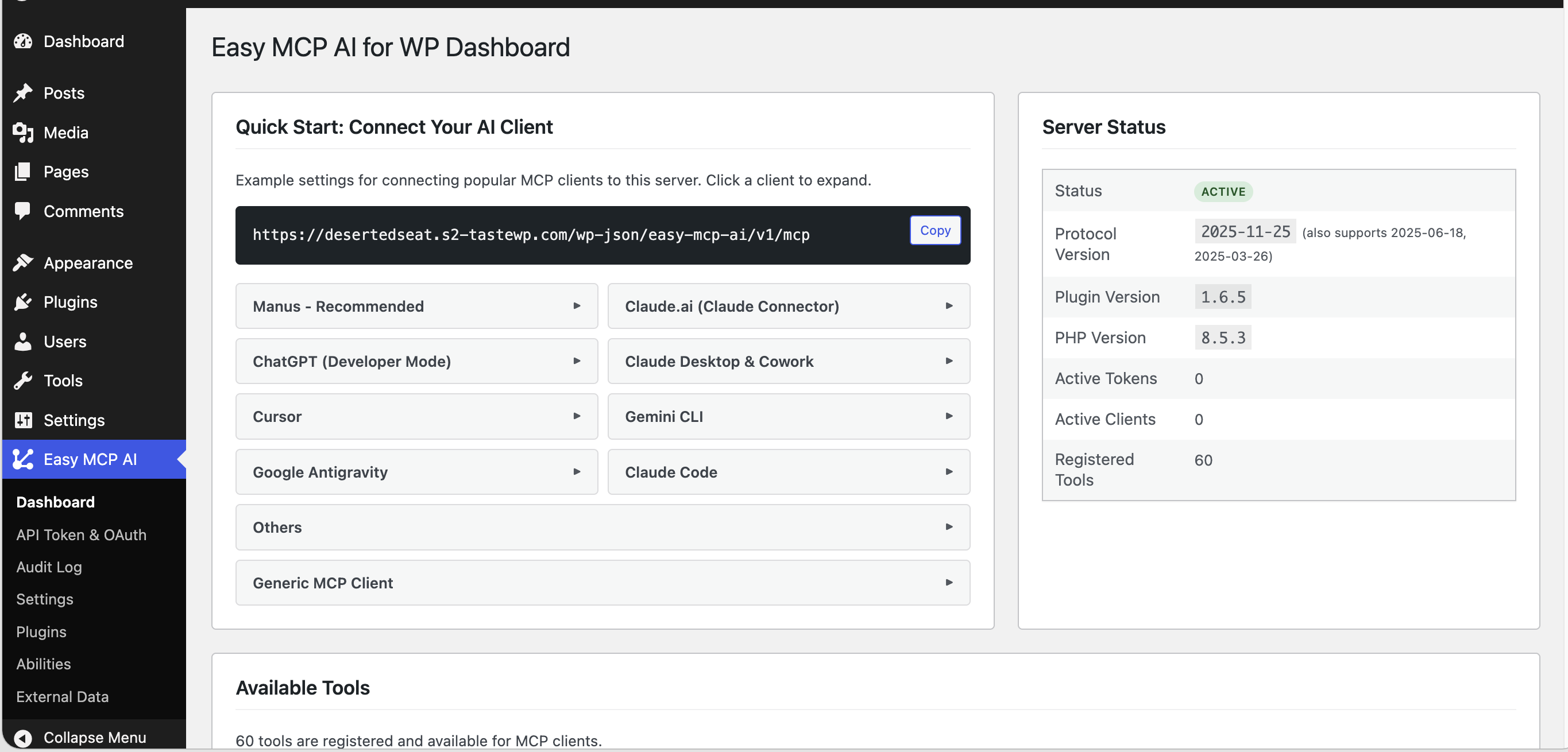
- In WordPress, open Easy MCP AI Dashboard and click Connect to Claude, or copy your MCP server URL and follow the steps below.
- In Claude, open Settings Connectors, add a connector, paste your MCP server URL, then click Connect.
- Sign in to WordPress, choose what the AI may read or change, and click Approve.
For Claude Code, run the command shown on the dashboard, then use /mcp in Claude Code to sign in. See the Claude integration guides.
Connect ChatGPT to WordPress
- On the dashboard, click Connect to ChatGPT. The button opens the Connectors screen in ChatGPT Developer Mode.
- Enter a name such as “WordPress”, paste your MCP server URL and leave Authentication set to OAuth.
- Confirm any warning ChatGPT shows for custom MCP servers, click Create, then approve access on your WordPress site.
See the ChatGPT guide.
Connect Cursor, Codex, GitHub Copilot & Other AI Agents
Every client below uses the same MCP server URL from your dashboard.
- Cursor: use the one-click Add to Cursor button, or paste a config into
mcp.json - GitHub Copilot in VS Code: install with the one-click Install in VS Code button
- OpenAI Codex CLI: copy the prepared
codex mcp addcommand, which includes your API token and connects through the mcp-remote bridge - Google Antigravity (Gemini): add the server to the MCP config, then authorize with OAuth
- Windsurf, Cline, Roo Code, Zed, OpenCode, LibreChat, Manus and Pydantic AI: copy-paste configs on the dashboard
- n8n: follow the n8n guide
- Any other MCP client that supports the Streamable HTTP transport. Clients that support only stdio connect through the mcp-remote bridge, which runs on your own computer, not on a hosted server.
Browse all integration guides.
What Your WordPress AI Agent Can Do
Content management: draft, rewrite, schedule and publish posts and pages. These tools also work in any custom post type, run find-and-replace inside content and restore revisions.
Gutenberg and site editing: create and edit Gutenberg blocks, reusable blocks, block templates and global styles.
Media: upload media from a file or a URL. For URL uploads the plugin downloads the file, and your AI agent can set alt text and captions.
Site admin: manage users, roles and user meta. Moderate comments and update site settings. Handle menus, categories, tags and custom taxonomies, and list plugins and themes.
Try prompts like:
- “Write a 500-word post about healthy eating and save it as a draft.”
- “Show today’s WooCommerce orders and total revenue.”
- “What keywords does my homepage rank for, and how many clicks do they get?”
WooCommerce MCP: Run Your Store with an AI Agent
47 WooCommerce tools give your WooCommerce AI agent control of products, variations, attributes, orders, customers, coupons and webhooks. Your AI agent can also read refunds, shipping zones and methods, tax rates and payment gateways, pull sales and top-seller reports, and bulk-update products, variations and orders.
SEO MCP for Yoast, Rank Math, AIOSEO, SEOPress, Slim SEO & The SEO Framework
Easy MCP AI works as a Yoast MCP or Rank Math MCP connector. It exposes your Yoast SEO or Rank Math fields as MCP tools. Your AI agent reads and updates SEO titles and meta descriptions. Where the SEO plugin supports them, it also edits canonical URLs, robots meta tags, Open Graph data, focus keywords and schema settings. Supported fields depend on the SEO plugin and on the version you run.
Google Analytics MCP, Search Console MCP & Semrush MCP
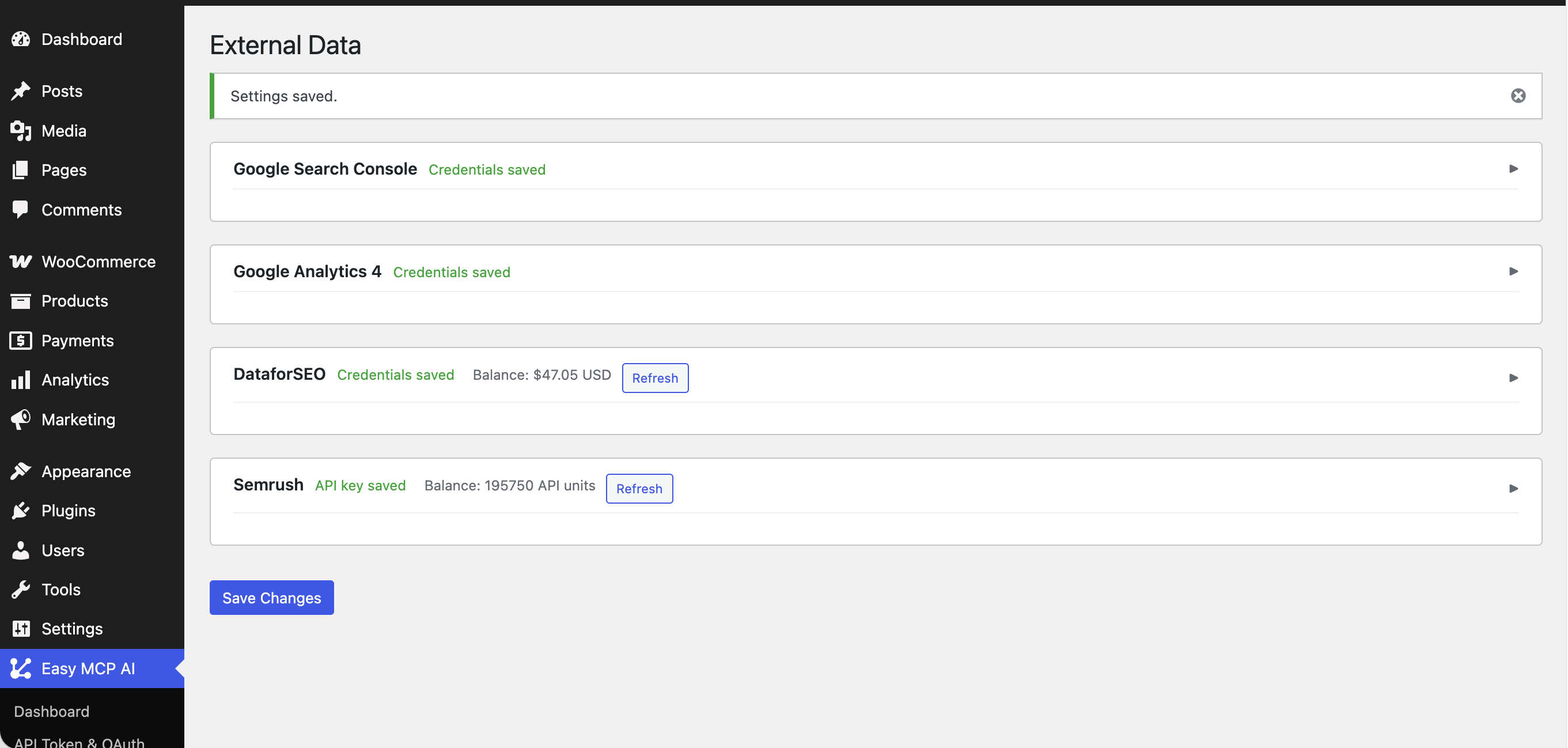
Pull data from Google Analytics, Search Console, Semrush, SE Ranking, DataForSEO and Ahrefs into chat. The 54 tools below use your own provider accounts and API keys.
- Google Analytics 4 (11 tools): traffic, top pages, conversions, custom dimensions and realtime users
- Google Search Console (6 tools): search queries, clicks, impressions, CTR, position, sitemaps and URL indexing
- Semrush (13 tools): domain overview, organic keywords, competitors, keyword difficulty and backlinks
- SE Ranking (15 tools): keyword and backlink research, competitors, top pages and AI-search visibility
- DataForSEO (8 tools): live search results pages, search volume, ranked keywords, backlinks and on-page SEO audits
- Ahrefs (1 tool): Domain Rating for any domain with a free Ahrefs APIv3 key. Show the credit “Domain Rating by Ahrefs” wherever you display the rating.
Setup: open Easy MCP AI Tools External data. Upload a Google service-account key file (a JSON file), then set your default GA4 property and Search Console site. Add Semrush, SE Ranking, DataForSEO or Ahrefs credentials, click Test, and enable the tools you want.
Easy MCP AI calls a provider in three cases: when you save or test the credentials, when the External data tab loads account details, and when an AI client runs one of that provider’s tools.
ACF, The Events Calendar & BuddyPress
- Advanced Custom Fields (ACF): 6 tools to read and update ACF fields on posts, users and terms, and list field groups
- The Events Calendar: 10 tools for events, venues and organizers
- BuddyPress: 10 tools for members, groups, activity and private message threads
WordPress Abilities API & MCP Adapter
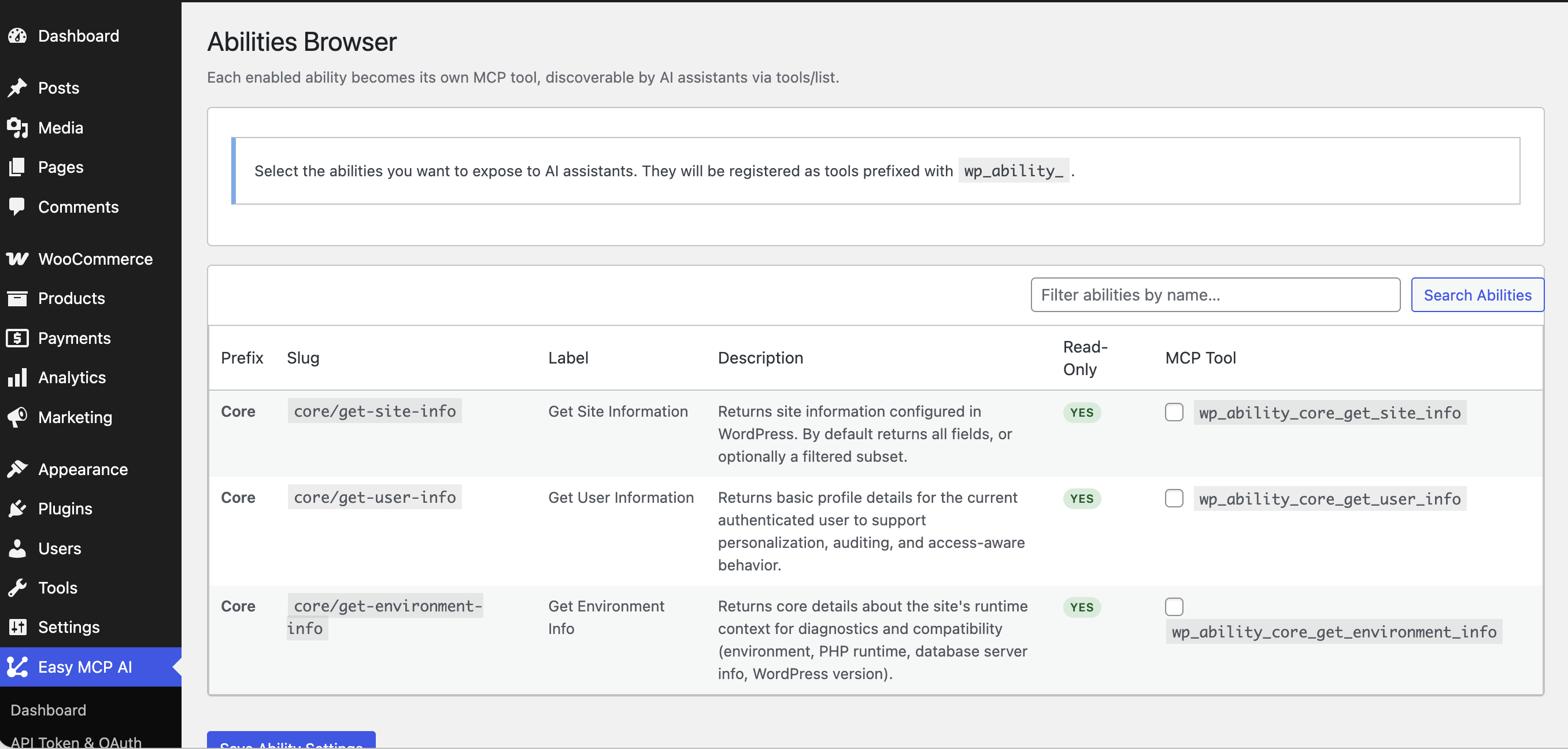
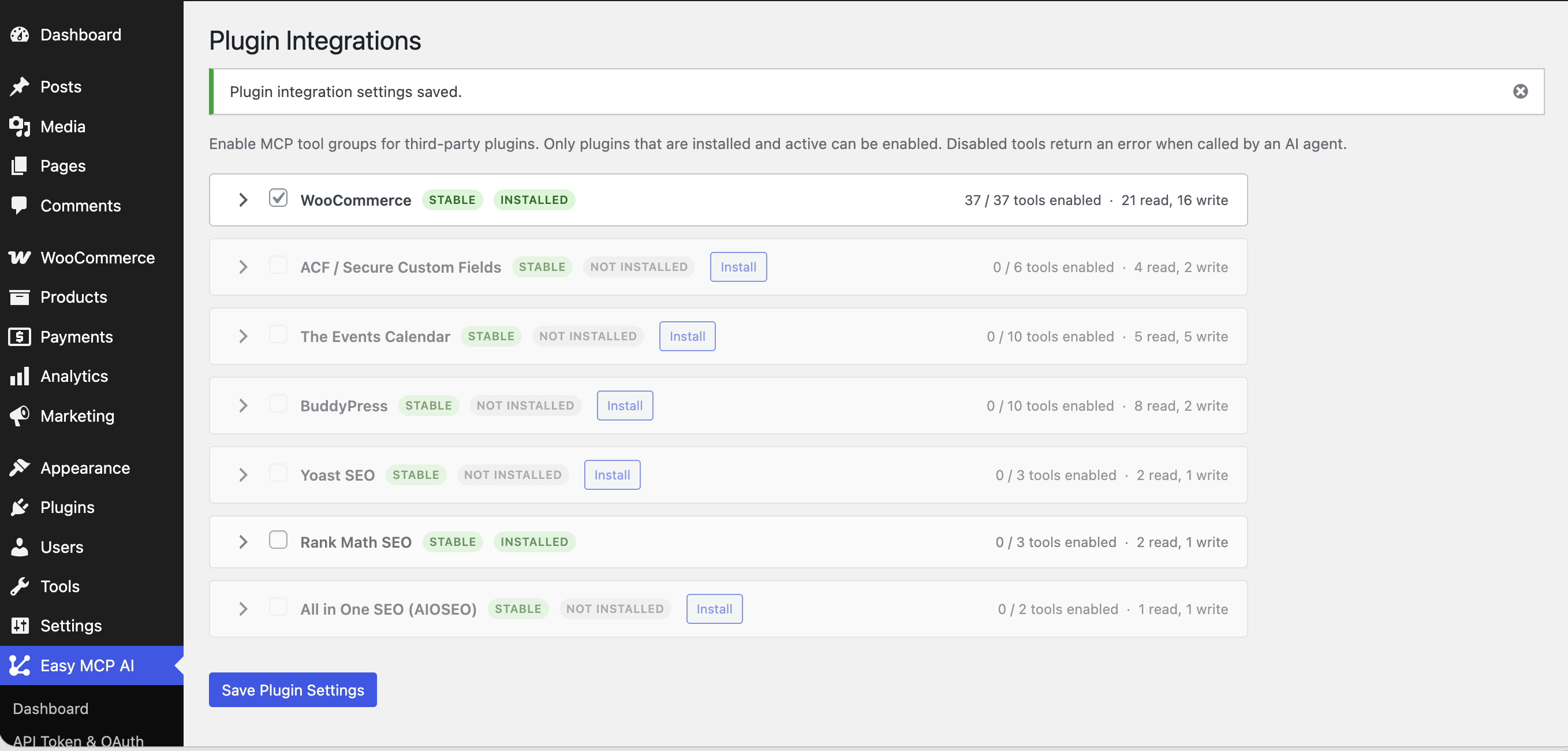
WordPress 6.9+ lets plugins register Abilities. Easy MCP AI acts as a WordPress MCP adapter for them. Under Easy MCP AI Tools Abilities, select the abilities you want and save. The ones you select become MCP tools, and the adapter exposes nothing else. No adapter code is required. Find compatible plugins in the Abilities directory.
Change History & Audit Log
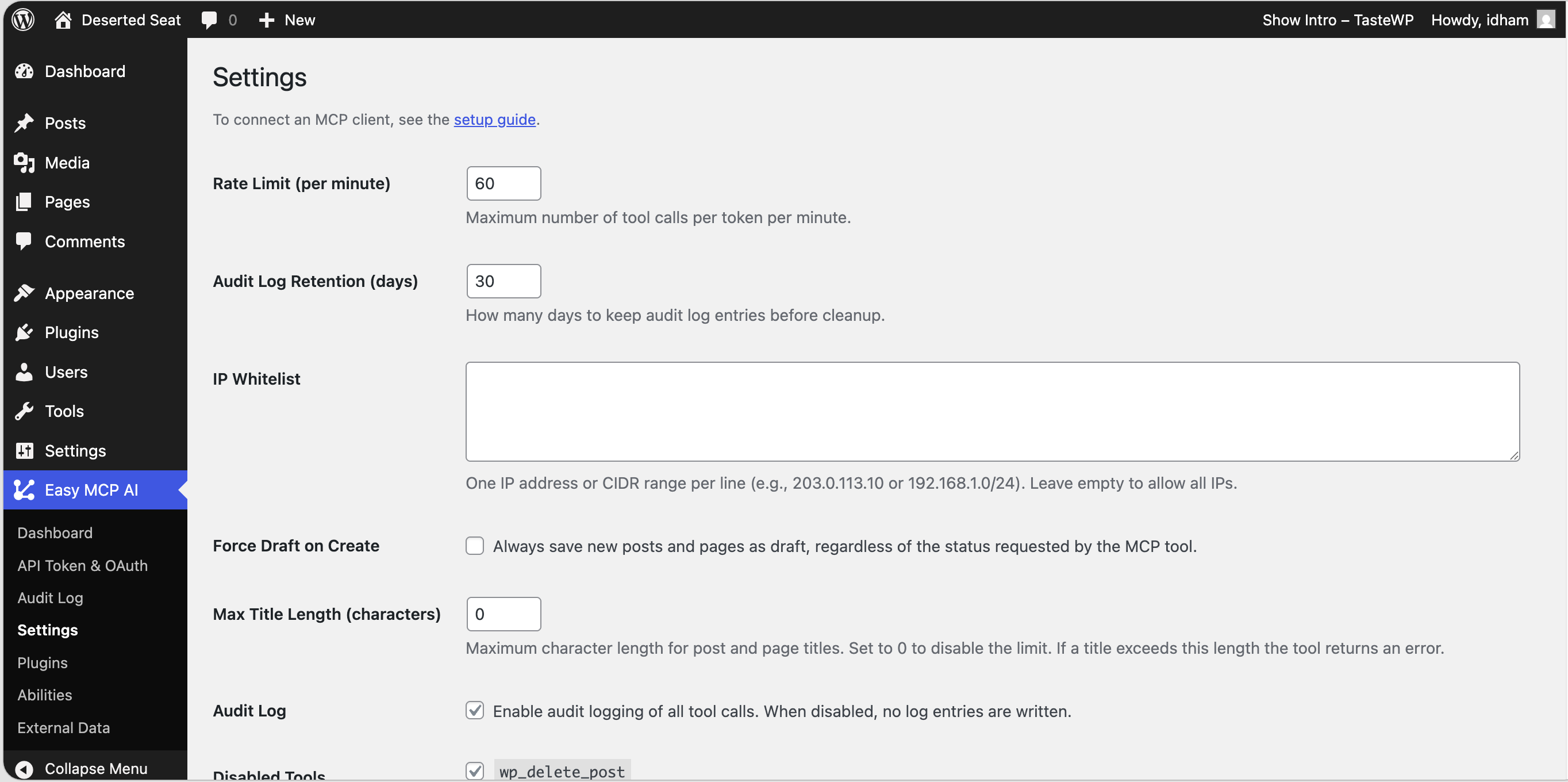
- Audit Log: when logging is on, the Audit Log records tool calls, including refused ones, with the token, tool, arguments, result, client IP and time. Entries are kept for 30 days by default.
- Change History: keeps before/after snapshots of what your AI client changes. It is enabled by default on new installs, and you can compare any recorded change in the admin. You can ask “what did the AI change on this post last week?” through the
wp_history_list,wp_history_getandwp_history_difftools.
Secure MCP Server for WordPress
Giving an AI client access to your site is a serious step. This MCP server runs inside WordPress, with no hosted relay in between. Tool results return to the authenticated client that requested them. Your content and credentials stay between your AI client and your own site, and the plugin sends nothing to its makers. The controls below cover sign-in, permissions, storage and logging.
- OAuth 2.1 with PKCE, Dynamic Client Registration, refresh-token rotation with reuse detection, audience binding and revocation
- WordPress permissions: every tool call runs as the WordPress user bound to the token or OAuth grant, with that user’s capability checks
- Least privilege: choose which tools each API token or OAuth grant can use, including read-only access
- Hashed tokens, encrypted credentials: token records are SHA-256 hashes, and external data credentials use AES-256-GCM encryption
- Rate limits and IP allowlist: 60 requests per minute per token by default, plus an optional IP allowlist for API tokens
- Force Draft on Create (off by default): any content your AI client creates is saved as a draft
- HTTPS: OAuth requires HTTPS on live sites (local loopback addresses are exempt), and API tokens should use HTTPS too
Screenshots
Installation
- In Plugins Add New Plugin, search for “Easy MCP AI”, click Install Now, then Activate. For manual installs, upload the ZIP under Plugins Add New Plugin Upload Plugin.
- Open Easy MCP AI Dashboard. Copy the MCP server URL, or use a one-click connect button.
- OAuth (Claude, Claude Desktop, ChatGPT, Cursor, VS Code, Antigravity): add the URL to your AI client. Then sign in to WordPress as the user you want that client to act on behalf of. Choose permissions and click Approve.
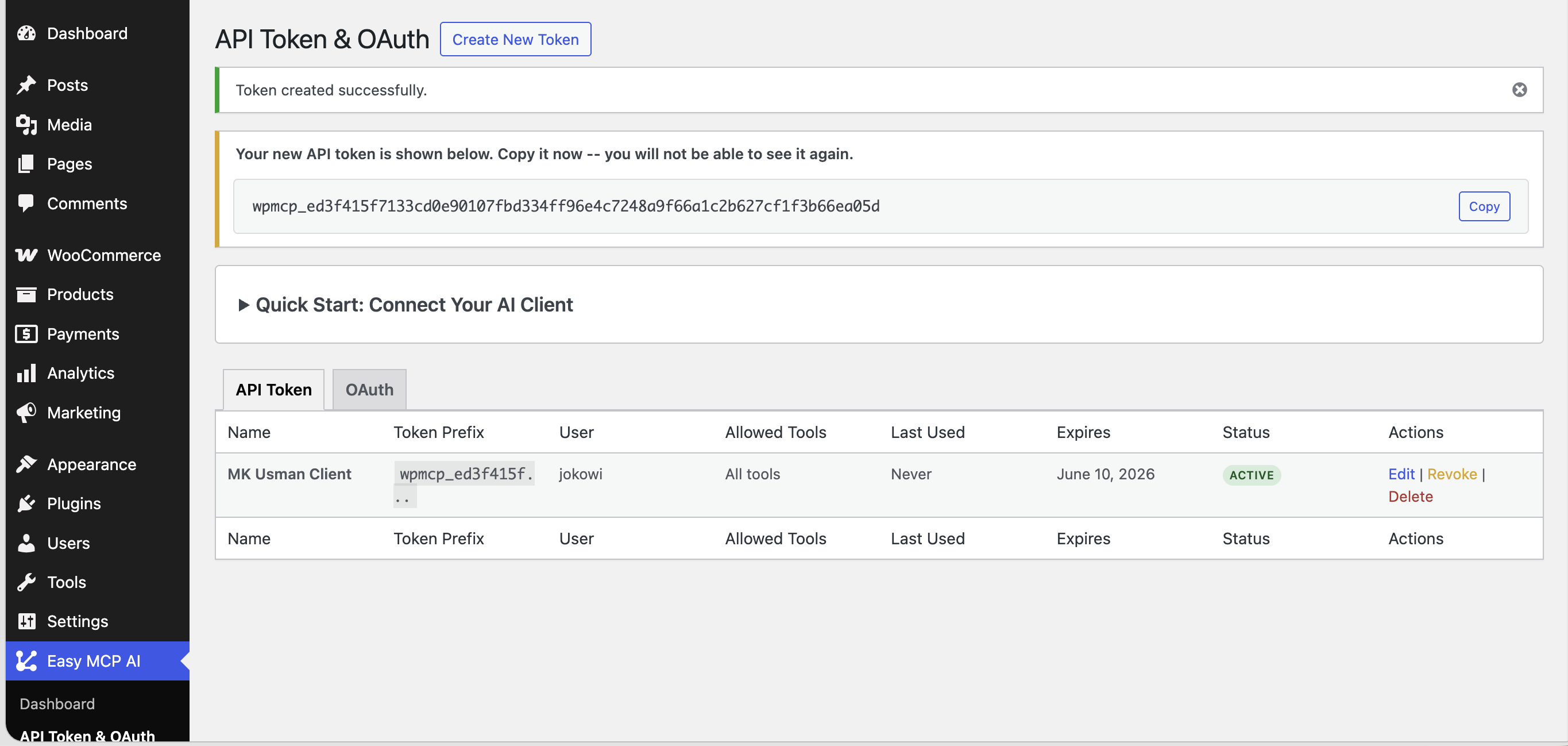
- API token (Codex CLI, Windsurf, Zed, LibreChat and other config-file clients): under Easy MCP AI Connections API tokens, create a token, choose the user and tools, then paste the URL and token into your client. Copy the token before you leave the screen. It is shown only once.
Revoke any OAuth client or token at any time under Easy MCP AI Connections, on its OAuth and API tokens tabs.
FAQ
-
Is Easy MCP AI secure?
-
Yes, within the limits you set. Connections use OAuth 2.1 or hashed API tokens, and every tool call runs with the permissions of a real WordPress user. You can also limit each connection to specific tools. Rate limits cap how often an API token can be used, and an optional IP allowlist caps where it can be used from. The Audit Log and Change History let you review what each AI assistant does.
The server runs inside WordPress, with no hosted relay in between. Token records are SHA-256 hashes, and external credentials are encrypted with AES-256-GCM. The plugin itself does not call any AI provider. Abilities you enable from other plugins follow those plugins’ own behavior. Report vulnerabilities through the Patchstack Vulnerability Disclosure Program.
-
Can you connect Claude to WordPress with Easy MCP AI?
-
Yes. Easy MCP AI is the MCP server that Claude connects to. Install Easy MCP AI and copy your MCP server URL from Easy MCP AI Dashboard. Add it under Settings Connectors in Claude Desktop or the web app, sign in to WordPress and approve access. The integration guides show each step.
-
How do I use Claude Code with WordPress?
-
Run the command shown on the dashboard, then run the
/mcpcommand in Claude Code to sign in. Claude Code uses the same MCP server URL and the same approval screen as the Claude apps, so that screen is where you choose what Claude Code may read or change. You do not need any other MCP plugin for this. -
How do I connect ChatGPT to WordPress?
-
Click Connect to ChatGPT on the dashboard, name the connector and paste your MCP server URL. Keep OAuth selected, click Create and approve access on your site. ChatGPT may show a warning for custom MCP servers. This is normal.
-
Which AI assistants and AI agents work with Easy MCP AI?
-
All of the following connect through MCP: Claude (web, desktop, Cowork and Claude Code), ChatGPT, Cursor, GitHub Copilot in VS Code, OpenAI Codex CLI, Google Antigravity, Windsurf, Cline, Roo Code, Zed, OpenCode, LibreChat, Manus, Pydantic AI and n8n. Other MCP clients that support the Streamable HTTP transport work as well. Easy MCP AI lets you connect several AI assistants at once, each with its own token or OAuth grant, permissions and audit trail.
-
Is this a WordPress MCP server, an MCP plugin for WordPress or an MCP adapter for the Abilities API?
-
All three. Easy MCP AI is a WordPress MCP plugin that works with Claude and other MCP clients. It runs a complete MCP server inside WordPress at
/wp-json/easy-mcp-ai/v1/mcp. Once you approve access, Claude can use that endpoint as your WordPress MCP server. It supports MCP 2026-07-28 and stays compatible with 2025-11-25, 2025-06-18 and 2025-03-26 clients. It also works as an MCP adapter for the WordPress Abilities API, and adds 243 ready-made tools, OAuth and permission controls. -
What is the Model Context Protocol (MCP)?
-
MCP is an open standard, created by Anthropic, that lets AI assistants and AI agents connect to external data and services. OpenAI, Google and many other platforms support it.
-
How is it different from other WordPress AI plugins?
-
Most WordPress AI plugins embed one AI provider inside wp-admin and bill you for usage. Easy MCP AI is an AI connector that works the other way round. Your site becomes an MCP server, and you drive it from the AI client you already use. Use Claude or ChatGPT as an AI writing assistant, a WooCommerce AI agent or an SEO analyst, with your own model and plan. Some MCP plugins route every request through the maker’s cloud service, so the connection depends on that service and its plan limits. Easy MCP AI has no relay, and your AI client connects to your site directly.
-
Are my AI requests private, and do they pass through your servers?
-
No. Requests and tool results travel between your AI client and your own site, with no hosted relay or third-party server. If you are comparing with a hosted MCP service such as WPVibe, the difference is where the server runs: a hosted service proxies every request through the vendor’s servers, while Easy MCP AI runs inside your own WordPress install. The connection depends only on your site and your AI client, so it keeps working even if our service is down. The plugin is free, all 283 tools are included, and there is no vendor quota, only rate limits you set yourself, 60 requests per minute per token by default. The plugin sends nothing to us. The optional outside reachability check is a link that opens easymcpai.com in your browser, and it uses only your site address.
-
Is Easy MCP AI free?
-
Yes. Easy MCP AI is a free WordPress MCP server plugin and includes all 283 tools. Semrush, SE Ranking, DataForSEO, Ahrefs and Google APIs use your own accounts, so any API charges come from those providers. A provider such as Semrush, SE Ranking, DataForSEO, Ahrefs or Google is contacted only in three cases: when you save or test its credentials, when the External data tab loads account details, or when an AI client runs one of its tools.
-
Does it send my content to OpenAI, Anthropic or Google?
-
No, not to AI providers. The plugin never calls OpenAI, Anthropic or Google’s AI models. Your AI client calls your site, and tool results return to the authenticated client that requested them. The plugin does send your API credentials and per-call parameters to whichever analytics or SEO providers you have connected. These parameters include keywords, URLs and date ranges, and providers include Google Analytics, Search Console, Semrush, SE Ranking, DataForSEO and Ahrefs. Abilities you enable from other plugins follow those plugins’ own behavior.
-
Does it work with WooCommerce, Yoast, Rank Math, ACF and The Events Calendar?
-
Yes. Built-in tool sets cover WooCommerce, Advanced Custom Fields (ACF), The Events Calendar, BuddyPress, Yoast SEO, Rank Math, AIOSEO, SEOPress, Slim SEO and The SEO Framework. Each integration needs the matching plugin active. Turn each integration on under Easy MCP AI Tools Plugins.
-
Does it work with custom post types, ACF fields and Gutenberg blocks?
-
Yes. Post tools accept any registered custom post type. ACF tools read and write field values on posts, users and terms. Dedicated tools edit Gutenberg blocks, block templates and global styles.
-
Can I control what the AI is allowed to do?
-
Yes. Choose the tools for each token or OAuth grant. Bind each token or grant to a WordPress user whose capabilities fit the job, since permissions follow those capabilities. Note that you cannot restrict access to individual posts. For review before publishing, give the AI read-only or draft-only tools. Turn on Force Draft on Create, which is off by default.
-
Where can I see what the AI did?
-
When logging is on, the Audit Log records each AI assistant’s tool calls with the token, tool, arguments, result, client IP and time. Change History stores before/after snapshots of AI edits. You can compare before/after versions in the admin, or ask about them from chat.
-
Does it work on multisite, localhost or staging?
-
Yes. On multisite, each subsite has its own endpoint, tokens and logs. Network-level options need network capabilities. For local development, OAuth accepts plain HTTP on direct loopback requests (127.0.0.1 or ::1). Behind a local HTTPS proxy used for development, add
define('EASY_MCP_AI_OAUTH_ALLOW_HTTP', true);towp-config.php. Never set that flag on a live site. -
Why does the endpoint return 404 or 401?
-
- 404: use the exact MCP server URL from the dashboard. If the route is still missing, re-save Settings Permalinks to flush rewrite rules.
- 401: check that your client sends
Authorization: Bearer <token>and that the token still exists. For OAuth, disconnect and re-approve the connector. Some hosts strip the Authorization header. The diagnostics on Easy MCP AI Dashboard identify the likely cause and suggest a fix.
-
My site uses Cloudflare Flexible SSL. Why can’t AI assistants connect?
-
Flexible SSL sends requests to your server over plain HTTP, so the OAuth sign-in refuses to issue tokens. Existing API tokens keep working. The best fix is switching Cloudflare SSL/TLS to Full (Strict). Use the next step only when a trusted proxy sets the
X-Forwarded-Protoheader. In that case, add this above/* That's all, stop editing */inwp-config.php:if ( isset( $_SERVER['HTTP_X_FORWARDED_PROTO'] ) && 'https' === $_SERVER['HTTP_X_FORWARDED_PROTO'] ) { $_SERVER['HTTPS'] = 'on'; }
Reviews


Contributors & Developers
“Easy MCP AI – Connect Claude to WordPress: MCP Server for ChatGPT & AI Agents” is open source software. The following people have contributed to this plugin.
Contributors

Interested in development?
Browse the code, check out the SVN repository, or subscribe to the development log by RSS.
Changelog
2.0.0
- New admin experience: a three-step setup (connect a client, verify, try a prompt), a dashboard showing what the AI changed this week, and five clear sections: Dashboard, Connections, Tools, Activity and Settings.
- Pause all AI access with one switch: clients stay connected, but every tool call is refused until you resume.
- Pick Read-only, Full access or Custom when approving an AI client or creating a token, instead of ticking tools one by one.
- 39 new tools (283 in total):
- Moderate comments: approve, unapprove, spam, restore, trash, reply and bulk-moderate.
- Manage plugins and themes: activate, deactivate, update, switch themes and list available updates.
- Check site health: Site Health status, cron events (and run one), the PHP error log and the plugins own diagnostics.
- Edit widgets and sidebars on classic themes.
- Change theme mods and Additional CSS.
- Reorder menu items and set their nesting in one call.
- Block themes: edit headers and footers, apply style variations, discover patterns, and read or patch the blocks in a post.
- List the terms of any taxonomy and filter media by taxonomy, such as Media Library Organizer folders.
- Read and update Yoast SEO for categories and tags, including as an Editor.
- Self-service API keys: when an admin enables it, eligible users create and revoke their own keys from their profile page.
- Configure deployments from wp-config.php: every setting can be a constant and shows as locked in the admin. White-label the plugin name, or hide its admin screens or plugin row. wp-config constants · White-label
- API keys only work on the site that issued them, so a copied database (staging, clone) carries no working keys. A www or https switch keeps them working, and a real domain move takes one Re-bind click per key.
- After a site address change, see the OAuth grants issued for the old address and revoke them in one click.
- Optional HMAC hashing for API keys and OAuth credentials, with key rotation.
- MCP Tasks: WordPress Abilities that declare long-running work return a task the AI client can check on, instead of timing out (MCP 2026-07-28 clients).
- Term meta accepts arrays and objects.
- Share anonymous feedback from the admin footer or the Help card.
- Security: SCF and Meta Box abilities refuse PHP callback names and reserved or invalid slugs.
- Fixed Rank Math, Yoast, SEOPress and The SEO Framework fields being silently dropped when written through the post meta tool or the post and page tools.
- Fixed ACF tools missing field groups the user can edit, and reporting success for fields that were not saved.
- Fixed the Antigravity steps in the plugins connect guide.
1.7.18
- Added support for MCP 2026-07-28 while retaining support for earlier MCP clients.
- Fixed MCP connections blocked by REST security plugins or missing Authorization headers.
- Fixed API key authentication for MCP clients that use Basic authentication.
- Improved audit logs with user, credential, client, duration, search, and filters.
- Added uploads of files from AI clients to the WordPress media library.
- Added confidential OAuth client support with request body and HTTP Basic secrets.
- Added device login for MCP clients that cannot open a browser.
- Add expiration presets to API token creation and editing
- Fixed cleanup of expired OAuth tokens that were never refreshed or revoked.
- Fixed client address detection behind configured trusted proxies.
- Fixed IP whitelist enforcement for OAuth grants.
1.7.17
- Easy MCP AI is now part of Themeisle. Your setup keeps working as before, with no action needed.
1.7.16
- New: Four new diagnostics find connection problems that sit outside WordPress, on your host, CDN or another plugin.
- New: Diagnostics warn when a saved copy of your sign-in details no longer matches this site.
- New: Calls refused before they run are now recorded in the Audit Log.
- Fixed: Refused and failed sign-in rows in the Audit Log no longer show a green OK.
- Fixed: Several diagnostics now name the actual cause instead of a generic one.
1.7.15
- New: The Ahrefs Domain Rating tool now takes a free Ahrefs APIv3 key, which Ahrefs began requiring.
- New: Diagnostics now name any ability you switched on that WordPress did not register.
- Fixed: Diagnostics no longer warns about caching, firewalls or change-tracking when nothing is actually wrong.
- Fixed: Media and post counts are returned as numbers instead of text.